
Automatic Break Deductions for Canadian Construction Companies
Canadian provinces require breaks after a set number of hours, but tracking deductions manually across dozens of workers is slow and error-prone. Here's how to automate it.

Every province in Canada has rules about breaks. The specifics vary, but the pattern is the same: after a certain number of hours worked, your crew is entitled to an unpaid break. If you're running a construction company, that means someone in your office is responsible for making sure those breaks are deducted from every qualifying timesheet before payroll runs.
For a five-person crew, that's manageable. For thirty or sixty workers across multiple sites, it's a weekly exercise in tedium and risk.
The compliance problem is real
In Ontario, workers are entitled to a 30-minute eating period after five consecutive hours of work. In Alberta, shifts over five hours require at least one 30-minute rest period, and shifts over ten hours require two. British Columbia requires a 30-minute meal break after five consecutive hours. Manitoba, Saskatchewan, Quebec, each province has its own version of the same idea.
The common thread: if a worker puts in a shift that exceeds the threshold, a break should have happened, and it should be reflected on the timesheet.
If you're not deducting breaks, you're overpaying. That 30 minutes of unpaid break time across 40 workers, every day, adds up to real dollars. On the other side, if you're deducting breaks that shouldn't be deducted (short shifts, or shifts where the worker already took a longer manual break), you're underpaying. That creates payroll disputes and, in some cases, compliance issues.
Getting it right matters. Getting it right manually, across dozens of workers every pay period, is where things fall apart.
This post is about operational best practices, not legal advice. Always check your provincial employment standards for the specific rules that apply to your business.
Manual break tracking is where mistakes live
Here's what manual break deduction looks like in most construction offices.
The admin opens the timesheets for the week. They go through each entry, one by one. Did this worker's shift exceed five hours? If yes, apply the 30-minute deduction. If no, skip it. Repeat for every worker, every day, every pay period.
That sounds straightforward until you factor in the real world.
Some workers split their day across two job sites. Which entry gets the deduction? Some workers already took a manual break and logged it. Do you deduct on top of that, or does the manual break cover it? A worker clocked 4 hours and 55 minutes. Does the threshold apply, or not? What about salaried workers who are exempt?
These judgment calls, multiplied by dozens of workers per pay period, are where mistakes happen. Some workers get deducted twice. Some don't get deducted at all. Some get the right deduction on Monday but the wrong one on Thursday because the admin was rushing to get payroll out the door.
The result is payroll that's close enough most of the time but never consistently right. And when a worker notices an error on their pay stub, the conversation that follows costs more time than the original mistake.
How WorkxPro handles it automatically
In WorkxPro, you set two numbers in your tenant settings: the threshold (hours worked before a deduction applies) and the deduction amount (minutes to deduct). That's it.
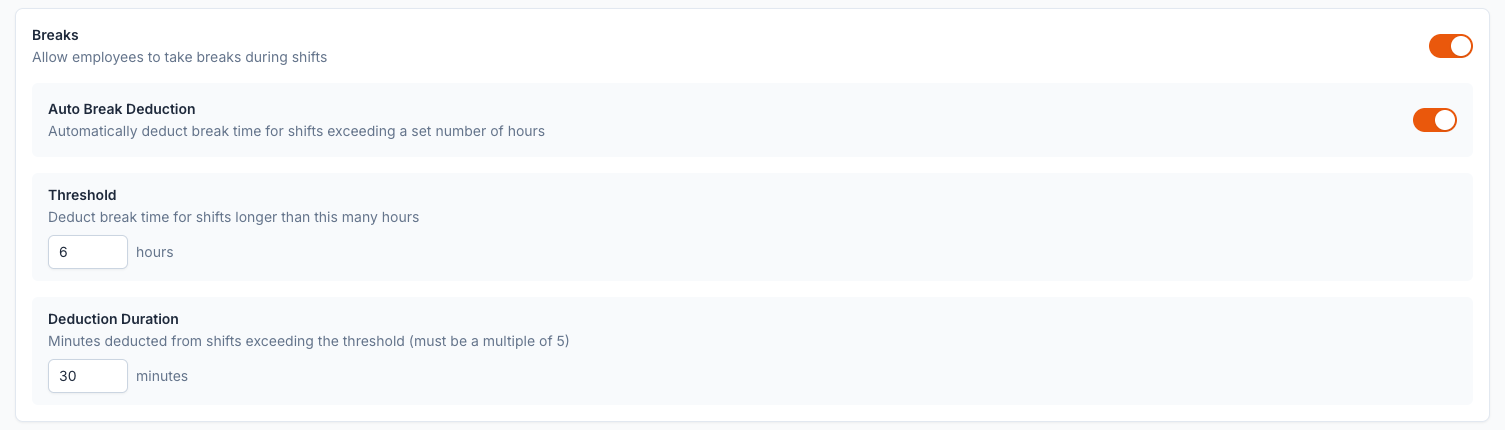
Once configured, the system applies the deduction automatically whenever a shift exceeds the threshold. No manual checking. No per-entry calculations. No spreadsheets.
The logic handles the edge cases that trip up manual processes:
- Split shifts are handled correctly. If a worker has two entries in a day (say, 3 hours at one site and 5 hours at another), the deduction is applied to the longest entry of the day. It doesn't get split across entries or applied twice.
- Salaried workers are skipped. Break deductions only apply to hourly workers. The system knows the difference and doesn't touch salaried entries.
- The deduction is visible during approval. When an admin reviews timesheets for the week, they can see exactly what deduction was applied to each entry. Full transparency for both sides.
This means the admin's weekly payroll prep goes from "check every entry against the threshold and manually apply deductions" to "review the entries that are already calculated and approve."
Manual breaks and automatic deductions work together
WorkxPro has built-in break tracking in the mobile app. Workers can start, pause, and resume breaks during their shift. This is useful when crews take lunch or other breaks and want to log them accurately.
So what happens when a worker takes a 45-minute lunch break manually, and your required deduction is only 30 minutes?
The system uses the larger number. If the worker's manual break (45 minutes) already exceeds the required deduction (30 minutes), no extra time is deducted. The formula is simple: the deduction equals whichever is greater, the required minutes or the actual manual break minutes.
This prevents double-deducting, which is one of the most common errors in manual break tracking. A worker who diligently logs their breaks shouldn't be penalized with an additional automatic deduction on top of what they already recorded. The system respects that.
On the flip side, if a worker doesn't log any manual break on a shift that exceeds the threshold, the automatic deduction kicks in and applies the required amount. The worker is covered either way, and payroll is accurate either way.
Why this matters for your bottom line
The math is straightforward.
If you have 40 hourly workers and you're missing the break deduction on even 20% of qualifying shifts, that's 8 workers per day with an extra 30 minutes of paid time that should have been deducted. Over a five-day work week, that's 20 hours. Over a year, that's more than 1,000 hours of payroll that didn't need to be there.
On the other side, incorrect deductions create disputes that eat up admin time. A worker who sees 30 minutes missing from a shift where they only worked 4 hours is going to call the office. That conversation takes 10 minutes, and it erodes trust. Multiply that by a few workers per pay period, and it's a recurring drain on your team.
Automating the deduction eliminates both problems. The right amount is deducted from the right entries, every time, with no manual intervention.
Give your admin their time back
Break deduction is one of those tasks that feels small in isolation but adds up across a full crew and a full year. Every construction company in Canada has to deal with it, and most are still doing it by hand.
WorkxPro handles it in the background, correctly, so your office can focus on running the business instead of auditing timesheets line by line.
14-day free trial. No credit card required.