
Why Your Crew Hates Your Time Tracking App (And What to Do About It)
You bought a time tracking app. Your crew used it for a week. Now they're back to texting the foreman. Here's why it keeps happening and how to fix it.

You bought the app. You did the lunch-and-learn. You showed the crew how to clock in and out. Everyone nodded. For the first week, it worked. Mostly.
Then Monday of week two, three guys forgot to clock in. By Friday, your foreman was texting you hours again. Your office admin was back to manually entering timesheets and fixing errors. The app you paid for is sitting on everyone's phone, unused, right next to the flashlight and the compass.
This isn't a training problem. It's not laziness. Your crew didn't adopt the app because the app wasn't built for how they actually work.
The adoption problem nobody wants to talk about
Most time tracking apps are designed by people who work at desks. The interface looks great on a demo call. Clean screens, nice icons, a smooth walkthrough. Then your framer tries to use it at 6:30 AM with concrete dust on his hands, gloves on, and one bar of signal.
The app takes six taps to clock in. It needs internet to load the job site list. The GPS takes 30 seconds to lock. The worker makes a mistake selecting the wrong cost code, and there's no way to fix it without calling the office.
So what does he do? He texts the foreman: "Started at 6:30 at the Elm Street site." Because that takes five seconds and it actually works.
This is the cycle that kills every time tracking rollout. The app creates friction. Workers find a shortcut around the friction. The admin ends up doing manual data entry anyway. And you're paying for software that nobody uses.
The fix isn't more training. It's a better tool.
Live Activity: they don't even have to open the app
One of the biggest complaints workers have about time tracking apps is that they forget what's happening. Did I clock in? What job site am I on? How long have I been on this shift? So they open the app to check, which takes time, or they just don't bother and hope the admin sorts it out later.
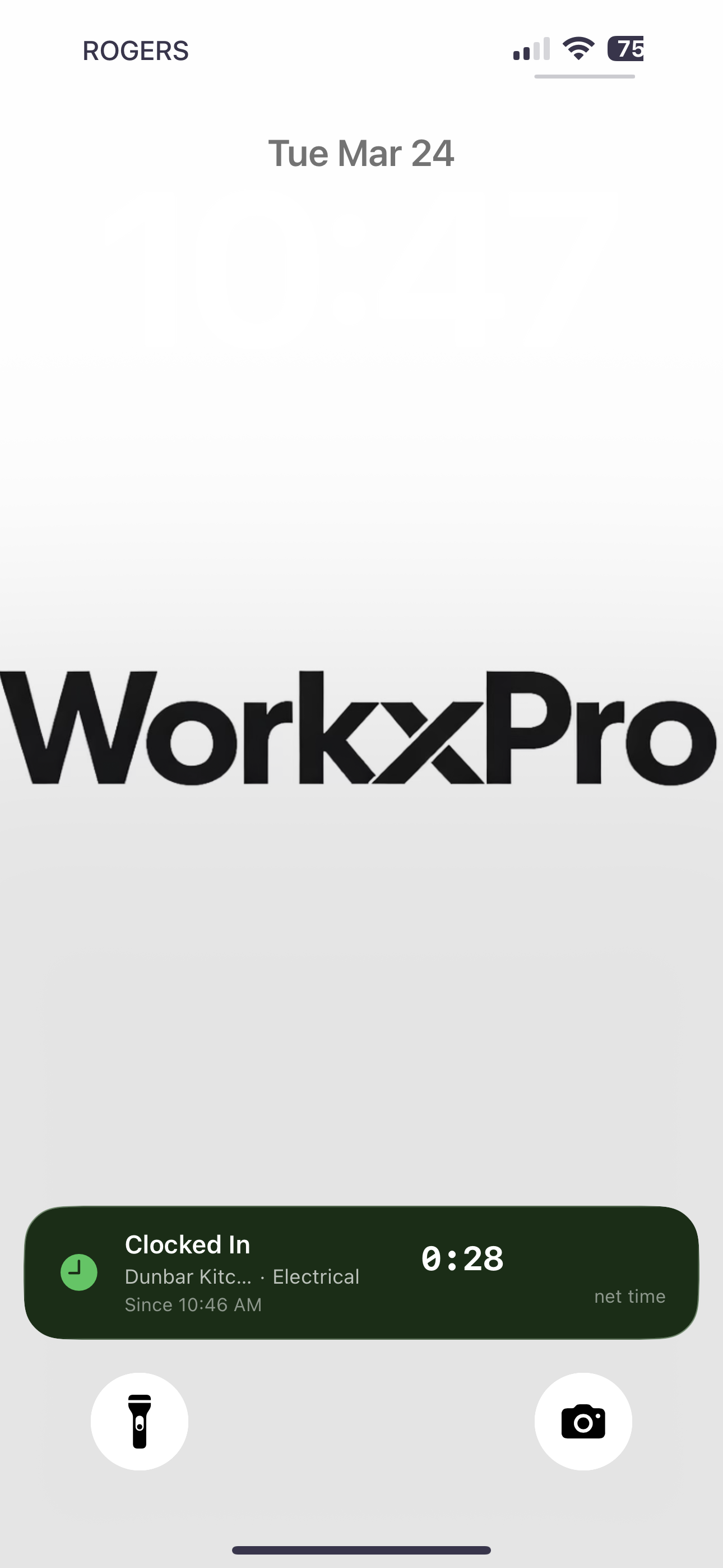
WorkxPro solves this with a Live Activity that shows directly on the phone's lock screen while a shift is running. The worker glances at their phone and sees their active job site, cost code, and elapsed time. No unlocking. No opening the app. No tapping through screens. Just a quick look at the lock screen, same as checking the time.
This sounds small, but it changes behavior. Workers stop second-guessing whether they clocked in. They stop doing mental math at the end of the day. The information is just there, always visible, always current.
Let workers fix their own mistakes
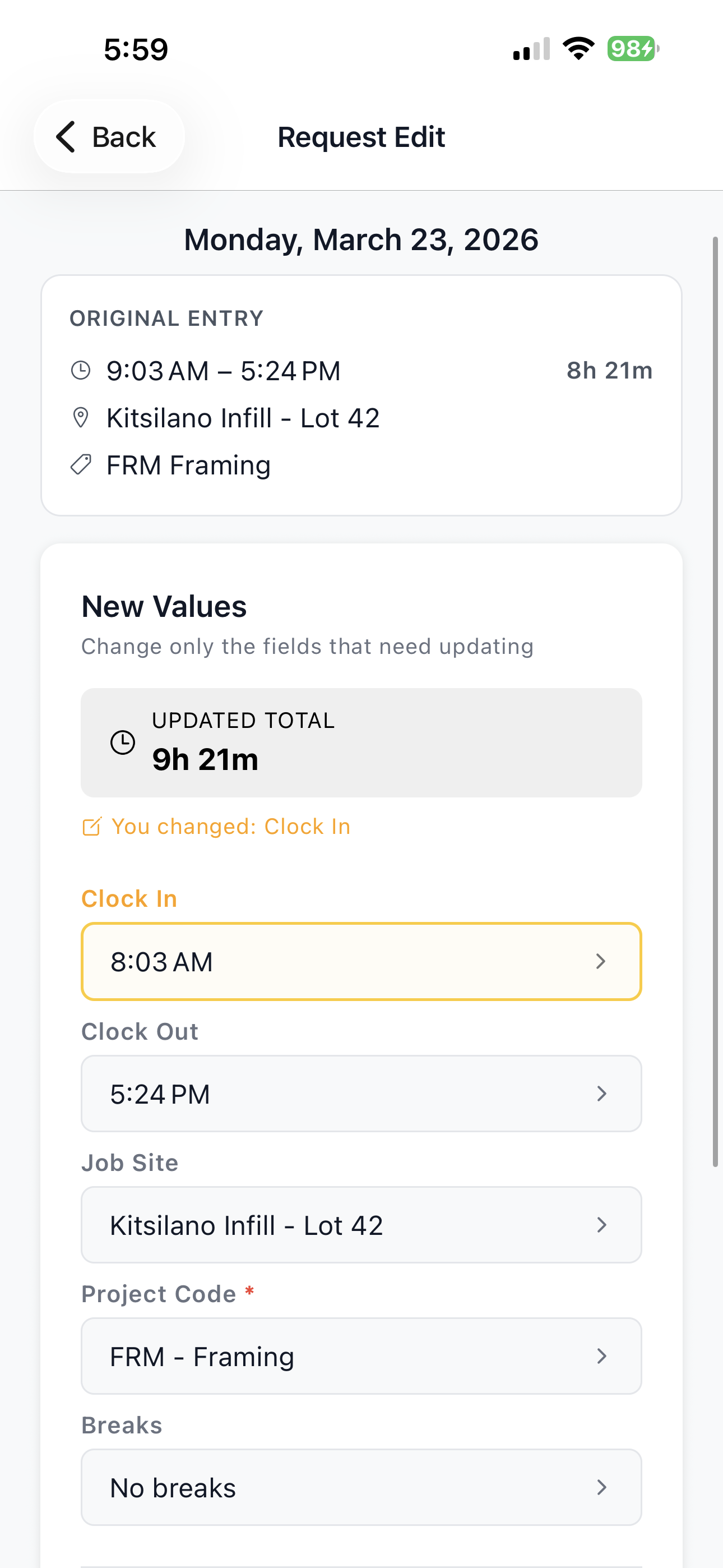
Here's a scenario that happens on every job site, every week. A worker forgets to clock out. Or they clocked in at the wrong job site. Or they started a break and forgot to end it. In most apps, the only option is to call or text the office and ask someone to fix it.
The admin writes it down, adds it to the pile, and gets to it when they can. The worker has no idea if it got fixed. A week later, payroll goes out and it's still wrong.
WorkxPro lets workers submit edit requests right from the app. They see their original time entry, change what needs changing (clock-in time, clock-out time, job site, cost code), add a note explaining why, and submit. The admin gets the request, sees the original and the proposed change side by side, and approves or denies it with one tap.
Workers own their time data. They don't have to chase anyone. And admins don't have to track down every mistake through a chain of texts.
Split shifts without the headache
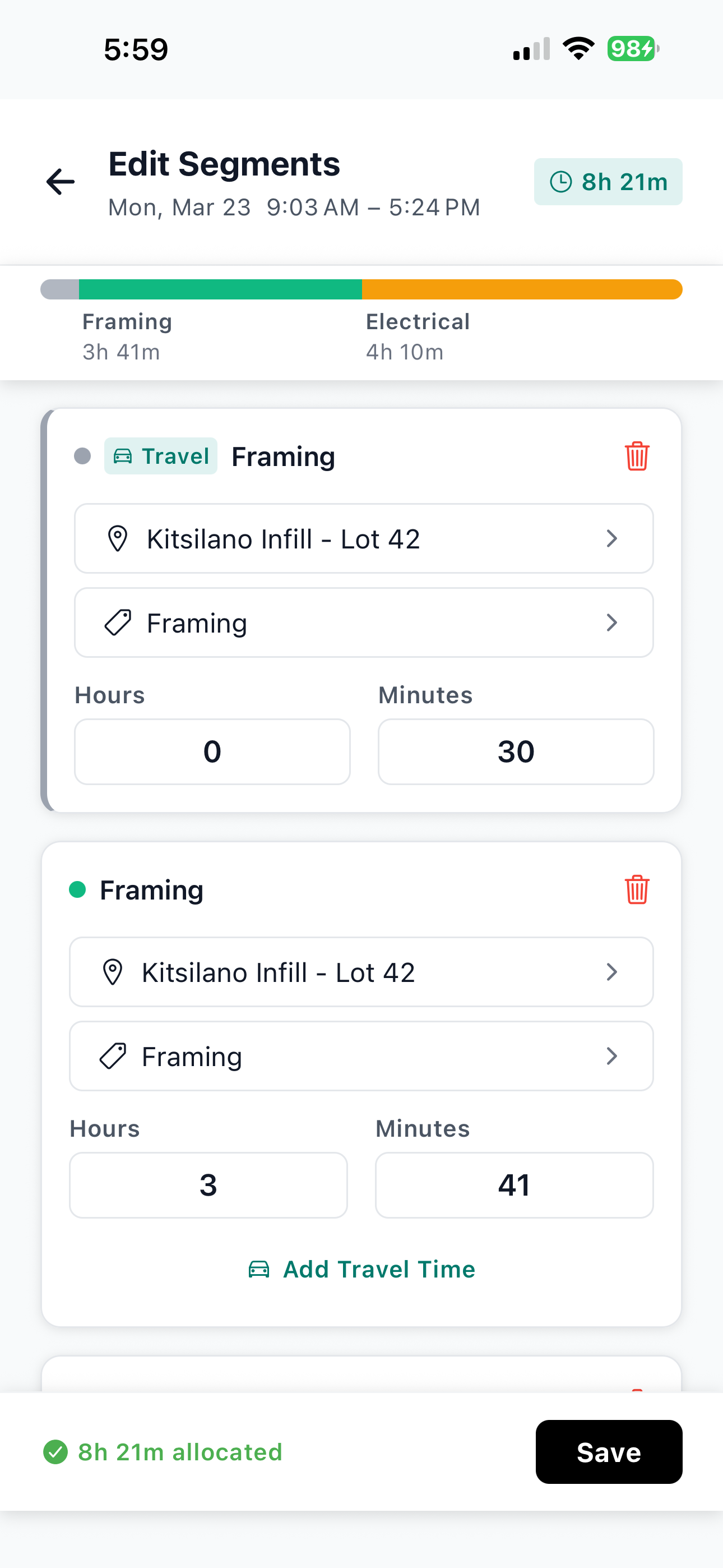
A worker spends the morning doing rough framing at the Elm Street site. After lunch, they drive to the Oak Ave project to help with drywall. In most time tracking apps, this means clocking out of one job and clocking into another. Two separate entries. Two separate job sites. If they forget, the admin has to split it manually later, guessing at the times.
WorkxPro handles this with shift segments. Mid-shift, the worker taps to split their current segment. Each part gets its own job site, cost code, and time allocation. Travel between sites gets tagged as travel time so it doesn't muddy your job costing numbers. All of it stays within a single shift, so there's no confusion about what happened when.
Your admin doesn't have to reconstruct anyone's day from memory. The data is clean from the start.
Built for the field, not the office
The details matter when you're building an app for people who work outside, in the cold, with dirty hands.
- Big tap targets. No tiny buttons that require precision tapping with wet fingers.
- Minimal steps. Clock-in takes two taps. Pick your job site, hit start. Done.
- Works offline. Everything runs locally on the phone. No signal? No problem. Data syncs automatically when connectivity returns.
- GPS without the hassle. Location is captured in the background. Workers don't have to stand still waiting for a signal to lock.
- Geofence reminders. When a worker arrives at a job site, they get a reminder to clock in. Not an automatic clock-in (that would be inaccurate), just a nudge so they don't forget.
These aren't premium features behind a paywall. They're the baseline. Because if the app doesn't work on a job site, it doesn't work at all.
The admin side: stop fixing everyone's timesheets
If you're the person in the office who spends Monday morning chasing down corrections, this is where your life gets better.
When workers can see their shift data on the lock screen, they make fewer mistakes. When they can submit edit requests themselves, they fix their own errors instead of dumping them on you. When segments are captured in real time, you don't have to reconstruct anyone's day from a text message.
The approval workflow in WorkxPro gives you a clean weekly view. You see every entry, every segment, every edit request. Approve, deny, or flag. That's it. The data comes in structured and accurate because the app collected it that way in the field.
Payroll prep goes from a half-day project to a 30-minute review.
Your crew doesn't hate time tracking. They hate bad time tracking.
Nobody wants to go back to paper timesheets. Your workers know that accurate time tracking means accurate paychecks. They're not fighting the concept. They're fighting a tool that makes their day harder instead of easier.
Give them an app that works the way they work: fast, simple, reliable, and forgiving when they make a mistake. They'll use it. And your office will finally have the clean data you've been chasing since day one.
Try WorkxPro free for 14 days. No credit card required. Set up your first job site in minutes and see why crews actually stick with this one. Start your free trial at getworkxpro.com